The concept of the home has undergone a radical transformation. Gone are the days when a house was merely a static physical shelter. Today, our living spaces have evolved into dynamic, responsive environments that interact with us, learn our habits, and adapt to our needs in real time.
This evolution is driven by the rapid rise of smart home devices, which have transitioned from high-tech novelties for early adopters into essential utilities for modern households.
At its core, home automation is not about showing off futuristic technology; it is about building a connected home that active, busy people can manage with absolute ease.
By integrating the right smart home gadgets, you can dramatically improve your daily convenience, fortify your home’s security, and achieve unprecedented levels of energy efficiency.
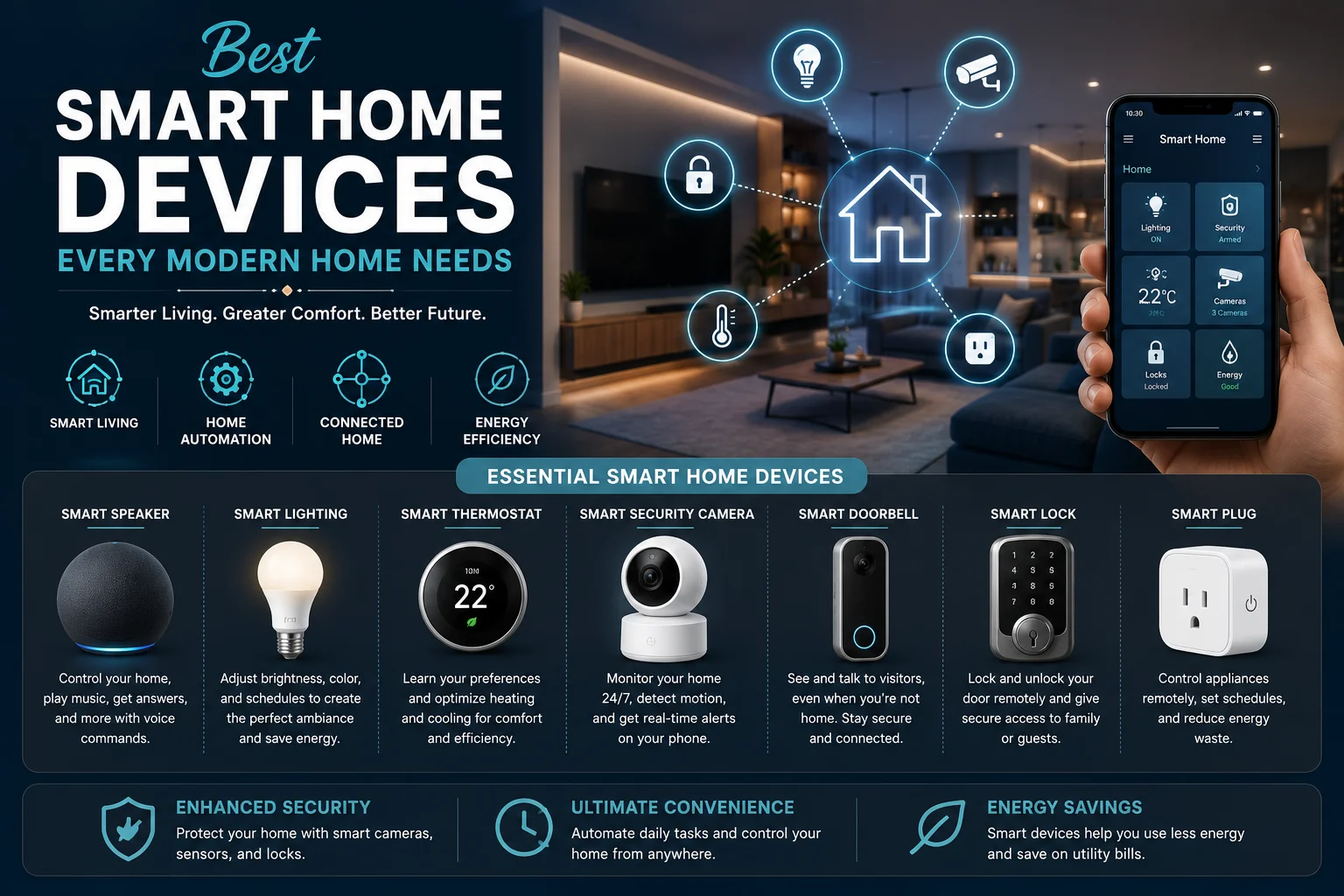
This comprehensive, master-level guide explores the essential smart home products that every modern household needs, offering deep insights into how these technologies work together to create a seamless, eco-friendly, and highly secure environment for smart living.
read more about community amenities
Part 1: The Modern Smart Living Philosophy: Connected, Seamless, and Unified
Before investing in individual hardware, it is critical to understand how the modern smart home ecosystem operates.
For years, the smart home industry was plagued by fragmentation. Users had to manage a chaotic web of separate, disconnected apps for their lighting, security, heating, and entertainment. This friction often defeated the entire purpose of automation.
The Matter Era: Future-Proofing Your Connected Home
The smart home landscape has entered a golden age of unification, primarily driven by Matter.
Matter is an open-source, industry-unifying connectivity standard developed by major tech giants, including Apple, Google, Amazon, and Samsung.
-
How it works: Matter allows smart devices from entirely different brands to communicate directly with one another locally over Wi-Fi or Thread, without relying on complex cloud-to-cloud integrations.
-
Why it matters for you: When buying smart home products, prioritizing Matter-compatible devices ensures your system is future-proof. A Matter-certified smart plug will work seamlessly with your Apple HomePod, Google Nest Hub, or Amazon Echo speaker, freeing you from brand lock-in.
Choosing Your Smart Home Hub & Voice Assistant
A smart home hub acts as the “brain” of your home automation system, translating your commands and running automated routines behind the scenes.
-
Amazon Alexa / Echo Show Series: Offers the widest device compatibility in the industry, making it the ideal starter platform for highly diverse hardware setups.
-
Google Home / Nest Hub Series: Powered by Google’s advanced Gemini AI models. It is highly regarded for its conversational voice-control accuracy and seamless integration with Google Services.
-
Apple Home / HomePod: Built with a strict focus on local processing and user privacy. It is perfect for those heavily integrated into the iOS and macOS ecosystems.
-
Home Assistant (e.g., Home Assistant Green): Designed for advanced tech enthusiasts who want 100% local control, ultimate privacy, and deep customization without relying on any commercial cloud servers.
Part 2: Convenience-Boosting Smart Home Devices
Convenience is the most immediate luxury a smart home provides. By automating repetitive daily actions, you can eliminate minor household frictions and reclaim precious time.
1. Advanced Smart Lighting Ecosystems
Smart lighting is the classic gateway into smart living. However, modern smart lighting goes far beyond simply turning on a bulb with your phone.
-
Smarter Scheduling: Instead of physically walking around your house flipping switches, smart lighting allows you to program entire “scenes.” For example, a “Good Night” scene can instantly dim all lights to 10%, turn off the main living area lights, and illuminate a soft pathway to the bathroom.
-
Circadian Rhythm Matching: Advanced smart bulbs (such as Philips Hue or TP-Link Tapo) can automatically adjust their color temperature throughout the day. In the morning, they emit a crisp, blue-toned white light to boost cortisol and wake you up. As evening approaches, they gradually shift to a warm, amber, blue-free glow to encourage melatonin production and prepare your body for deep rest.
-
Smart Switches vs. Smart Bulbs:
-
Use smart bulbs if you want to play with millions of colors and individual bulb dimming.
-
Use smart switches if you want to control entire banks of ceiling lights at once while keeping your existing physical switches operational (preventing guests from accidentally cutting power to your smart bulbs).
-
2. Automatic Smart Blinds and Shades
Automating your window coverings is a small change that dramatically alters the ambiance of your home.
-
Natural Wake-Up Routines: Instead of waking up to a jarring, loud alarm clock, you can program your bedroom shades to open slowly over 15 minutes, starting at 7:00 AM, allowing natural morning sunlight to wake you up gently.
-
Sun Tracking: Smart shades can adjust their height based on the angle of the sun throughout the day. This prevents harsh glare on your computer or TV screens and protects your expensive hardwood floors and furniture from UV fading.
3. Hands-Free Robotic Vacuums and Mops
Modern robotic vacuum cleaners have evolved far beyond the clumsy bump-and-turn pucks of the past.
-
Precision LiDAR Mapping: Today’s premium robovacs use advanced LiDAR (Light Detection and Ranging) and AI obstacle-avoidance cameras to map your home with millimeter precision. They can easily identify and avoid loose phone charger cables, pet waste, and shoes left on the floor.
-
Self-Emptying and Self-Cleaning Docks: The newest generation of robotic cleaners feature fully automated docks that empty the vacuum’s dustbin, wash the mopping pads with hot water, and dry them with warm air to prevent mold and foul odors. This allows for weeks of completely hands-free floor maintenance.
Part 3: Fortifying Your Home: Security-First Smart Devices
A truly smart home does more than serve you; it actively watches over you, providing robust, real-time protection and peace of mind.
1. Next-Generation Smart Locks
Your front door is the first line of defense. Modern smart locks completely replace physical keys with secure, encrypted digital access.
-
Biometric Access: High-end smart locks (such as the Ultraloq U-Bolt Pro or Aqara Smart Lock U100) feature rapid, capacitive fingerprint scanners that unlock your door in less than a second.
-
Temporary Guest Codes: Need to let in a housekeeper, a dog walker, or a delivery driver? You can generate temporary, time-sensitive access codes directly from your smartphone. You can program a code to work only on Tuesdays between 2:00 PM and 4:00 PM, and receive a push notification the moment it is used.
-
Auto-Lock Security: Many people suffer from anxiety about whether they locked the front door after leaving home. Smart locks use magnetic sensors to detect when the door is physically closed and automatically engage the deadbolt, keeping your home safe without you having to think twice.
2. Video Doorbells and Smart Security Cameras
Video doorbells and outdoor cameras serve as highly visible deterrents to potential intruders while keeping you connected to your front step.
-
AI Person and Package Detection: Older security cameras would bombard your phone with useless notifications every time a tree branch swayed or a stray cat ran past. Modern cameras (like the Arlo Pro series or eufy Security cameras) utilize local AI to instantly distinguish between humans, pets, vehicles, and delivered packages.
-
Two-Way Audio Communication: If a delivery driver arrives while you are at work or grocery shopping, you can use your smartphone to speak directly to them through the doorbell, instructing them exactly where to hide your package.
3. Smart Environmental and Leak Sensors
While burglaries are terrifying, the most common and expensive damage to a home often comes from within—specifically, slow, hidden water leaks.
-
Water Leak Detectors: Placing small, inexpensive smart water sensors under your kitchen sink, near your washing machine, and next to your water heater can save you thousands of dollars in water-damage repairs. If the sensor detects even a single drop of pooling water, it instantly sends an emergency alert to your phone.
-
Smart Main Water Valves: For the ultimate peace of mind, you can pair water leak sensors with a smart main water shutoff valve. If a sensor under your washing machine detects a leak, it can automatically trigger the main valve to shut off your home’s entire water supply in seconds, completely preventing a catastrophic flood while you are away on vacation.
Part 4: Maximizing Efficiency: Energy-Saving Smart Devices
With global energy costs fluctuating and the growing necessity of sustainable living, your smart home should double as a highly efficient, green machine. These energy-saving smart products pay for themselves over time by drastically cutting down your monthly utility bills.
1. Smart Thermostats
Heating and cooling make up over 50% of an average home’s energy consumption. A smart thermostat (like the Ecobee Smart Thermostat Premium or Google Nest Thermostat) is the single most effective way to slash this cost.
-
Algorithmic Routine Learning: Instead of relying on a rigid, manually programmed schedule, smart thermostats use built-in motion sensors and geofencing (tracking your smartphone’s location) to learn your daily routines.
-
Eco Modes: The thermostat automatically detects when the house is empty and enters “Eco Mode,” avoiding wasting energy on heating or cooling an empty home. It then begins cooling or heating the house just as you leave work, ensuring the temperature is perfect the moment you walk through the door.
-
Remote Room Sensors: Most homes have uneven temperatures, with some rooms feeling much hotter or colder than others. Smart thermostats utilize small, wireless remote sensors placed in various rooms to balance the climate, ensuring your bedroom is comfortable at night without over-conditioning your living room.
2. Individual Smart Radiator Valves
If you live in a home with radiator-based heating, smart radiator valves (such as those from Tado or Netatmo) provide incredible, room-by-room zoned heating.
-
No More Over-Heating: Instead of heating your entire house to a single temperature, smart radiator valves allow you to turn down the heat in empty guest rooms or unused dining areas while keeping your home office warm and cozy. This highly precise zoning can cut home heating bills by up to 30%.
3. Smart Plugs and Energy Monitors
Many household appliances consume “phantom energy”—electricity drawn even when the device is turned off or in standby mode (such as game consoles, coffee makers, and desktop computers).
-
Smart Plugs: These compact adapters plug into standard wall outlets, allowing you to cut power to any connected appliance remotely via an app or voice control.
-
Energy Tracking: High-quality smart plugs feature built-in energy monitors that track exactly how many kilowatt-hours an appliance is using in real time. You can set automated routines to cut power to your home entertainment system completely during the night, saving power and protecting your electronics from unexpected electrical surges.
Part 5: Comparing the Top Smart Home Ecosystems
To help you decide which smart home platform is right for your lifestyle, let us compare the three major ecosystems across critical performance metrics:
Part 6: Step-by-Step Guide to Planning Your Smart Home Build
Building a smart home can feel incredibly overwhelming. Many beginners make the mistake of buying too many devices at once, only to end up with a confusing system that is difficult to manage. The secret to success is a gradual, phased approach.
Part 7: Practical Security and Privacy Tips for Smart Homes
While the benefits of home automation are immense, bringing connected devices into your living space requires strict attention to cybersecurity. Protecting your digital home is just as important as locking your physical doors.
1. Secure Your Wi-Fi Router
Your router is the gateway to your entire network.
-
Change Default Credentials: Never leave your router’s administrator username and password as “admin/password.” Create a strong, unique, and complex password.
-
Enable WPA3 Encryption: Ensure your router is using the latest WPA3 security protocol to prevent hackers from intercepting your wireless traffic.
2. Create a Separate “Guest” Network for IoT Devices
Most modern routers allow you to create a secondary, isolated “Guest Network.”
-
The Strategy: Connect all of your smart home gadgets (smart bulbs, robot vacuums, smart plugs) to this isolated Guest Network, while keeping your personal devices (laptops, phones, banking details) on your primary network.
-
Why it works: If a hacker manages to compromise a cheap smart bulb with weak security, they will remain trapped on the isolated guest network, unable to access the sensitive personal data stored on your computer or smartphone.
3. Use Two-Factor Authentication (2FA)
Always enable Two-Factor Authentication on every smart home account (Google, Amazon, Arlo, Ring, etc.). 2FA ensures that even if someone manages to steal your password, they cannot gain access to your home’s security cameras or unlock your doors without entering a one-time verification code sent directly to your physical smartphone.
Embrace the Future of Smart Living
Dressing your home with modern technology is no longer a luxury reserved for science-fiction novels. Today, a connected home is within reach of anyone willing to take a thoughtful, step-by-step approach to home automation.
By investing in essential smart products—from the energy-saving capabilities of a smart thermostat to the uncompromising protection of a smart lock—you can craft a living space that works actively to make your life safer, simpler, and significantly more efficient.
Start small, focus on the fundamental pillars of convenience, security, and energy efficiency, and build a unified ecosystem that transforms your house into a true, intelligent home.
Part 8: Advanced Smart Home Automations for Next-Level Efficiency and Comfort
Once your smart home devices are installed and connected to a central ecosystem, the real magic of smart living begins. You no longer need to manually control devices through individual apps or even voice commands. Instead, your home should operate dynamically in the background, anticipating your needs.
This level of seamless synchronization is achieved through advanced automation routines (often called “if-this-then-that” scenarios). By combining sensors, geofencing, and schedule triggers, you can orchestrate complex, highly practical routines that elevate your everyday life.
Below are three advanced automation blueprints designed to maximize convenience, home security, and energy efficiency.
Automation Blueprint 1: The “Leaving the House” Routine (Security & Energy Saving)
This routine ensures that your home instantly locks down, turns off unnecessary power draws, and saves heating or cooling the moment the last person leaves.
-
The Trigger: Geofencing detects that the smartphones of all registered family members have moved more than 150 meters away from the house.
-
The Actions:
-
Locks: The smart lock engages the deadbolt automatically if it was left unlocked.
-
Climate: The smart thermostat adjusts to “Away/Eco Mode” (e.g., lowering heat to $16^\circ\text{C}$ in winter or raising AC to $26^\circ\text{C}$ in summer).
-
Lighting & Plugs: All smart lights throughout the house turn off. Smart plugs cut power to high-draw standby devices (like TVs and gaming consoles).
-
Security: Outdoor security cameras activate their motion-detection alarms and begin monitoring for people or packages.
-
Cleaning: The robotic vacuum departs its self-emptying dock to clean the floors while the house is completely empty.
-
Automation Blueprint 2: The “Natural Sunset” Routine (Circadian Comfort)
This routine transitions your home’s lighting and climate dynamically to match your biological clock, helping your body prepare for a restful night’s sleep.
-
The Trigger: 30 minutes before local sunset (tracked automatically via your hub’s location settings).
-
The Actions:
-
Lighting Color Temperature: Smart living room and bedroom bulbs gradually shift from a cool $5000\text{K}$ (daylight) to a warm, relaxing $2700\text{K}$ (amber).
-
Brightness: Overall lighting brightness dims to 50% over a 20-minute transition period.
-
Blinds: Smart window shades lower to preserve privacy and trap heat inside as the outdoor temperature drops.
-
Climate: The thermostat lowers by $1^\circ\text{C}$ to match the body’s natural temperature drop in the evening.
-
Automation Blueprint 3: The “Late-Night Water Emergency” Routine (Damage Prevention)
This life-saving routine coordinates smart sensors, smart lighting, and main valves to protect your property from catastrophic water damage, even while you sleep.
-
The Trigger: A smart water leak sensor under the washing machine or kitchen sink detects moisture.
-
The Actions:
-
Main Water: The smart main water shutoff valve immediately rotates to the “Closed” position, stopping all water flow into the home within 5 seconds.
-
Visual Warning: Smart bulbs in the master bedroom turn solid red at 100% brightness to wake you up immediately, without relying only on an audio alarm.
-
Notifications: An emergency high-priority push alert is sent to all family members’ smartphones, bypassing “Do Not Disturb” settings.
-
Part 9: Troubleshooting Common Connected Home Issues
Even the most advanced connected home can occasionally experience glitches, offline devices, or unresponsive routines. Knowing how to quickly troubleshoot these common issues will keep your smart home running smoothly without frustration.
1. The “Device Unresponsive” Dilemma
Sometimes, a smart light or plug will show up as “Offline” or “Unresponsive” in your Apple Home, Alexa, or Google Home app.
-
The Cause: This is almost always caused by a temporary drop in your local Wi-Fi signal or local IP address conflicts.
-
The Fix:
-
Do not immediately delete the device from your app. Instead, simply unplug the smart plug or turn off the physical wall switch for the bulb for 10 seconds, then restore power.
-
If the issue persists, check your router’s administration page. Ensure your $2.4\text{GHz}$ Wi-Fi band (which most smart home gadgets rely on) is not overcrowded. Assigning “Static IP addresses” to your most critical smart devices (like hubs, smart locks, and cameras) will prevent them from losing connection when your router reboots.
-
2. Physical Switch Conflicts (The “Guest” Problem)
If a guest or family member flips a traditional physical wall switch to “Off,” power to the connected smart bulb is cut completely, making it impossible to control via voice, app, or automation.
-
The Fix: Install smart switch guards over your traditional switches to prevent people from flipping them. Alternatively, replace your physical switches with smart wall switches or wireless buttons (like the Philips Hue Dimmer Switch). This allows guests to control the lights manually while keeping the underlying smart bulb constantly powered and online.
3. Delays and Lag in Automations
If you wave your hand in front of a smart motion sensor, and it takes 5 to 10 seconds for the overhead light to turn on, your automation is lagging.
-
The Cause: Cloud-to-cloud processing. If your motion sensor sends a signal to its cloud, which then talks to your smart hub’s cloud, which then talks to your light’s cloud, latency is inevitable.
-
The Fix: Transition to local-control devices. Prioritize Matter-over-Thread or Zigbee-based sensors. These devices process commands locally within your physical home network without needing to ping external internet servers, reducing latency to a near-instantaneous 50 milliseconds.
Part 10: Future Trends: What Lies Ahead for Smart Living?
The smart home of tomorrow will go beyond basic scheduled routines, moving toward true, proactive artificial intelligence. As we look to the future, three exciting technological shifts are set to redefine how we interact with our living spaces:
1. AI-Powered Generative Automations
Soon, you won’t need to manually program complex routines. Advanced AI models integrated into smart hubs (like Google’s Gemini-powered Google Home or Apple Intelligence-enabled Siri) will observe your daily patterns over a few weeks.
The system will then proactively suggest custom, highly complex automations, saying: “I noticed you usually make coffee at 6:45 AM, but only on mornings when your calendar shows a gym session. Would you like me to automate your coffee maker to match your workout schedule?”
2. Thread Protocol Dominance
Traditional Wi-Fi is power-hungry and can easily overcrowd your router if you have dozens of smart bulbs. Thread is a low-power, self-healing mesh networking protocol designed specifically for smart home gadgets.
If one Thread device goes offline, the other devices in your home automatically reroute the signal through each other to maintain a solid connection. In the coming years, almost all premium smart home devices will utilize Thread, resulting in unparalleled network speed and reliability.
3. Predictive Health Integration
Our smart homes will eventually play a vital role in personal preventative healthcare. By integrating smart home sensors with wearable health trackers (like smartwatches and rings), your home can adapt dynamically to your physical state.
If your wearable sensor detects high stress levels or an elevated resting heart rate, your home can automatically dim the lights, play calming ambient music, and adjust the indoor climate to encourage relaxation and recovery.
Whether you are starting from scratch in a small apartment or upgrading a multi-story family home, remember that a smart home is a personalized journey. You do not need to buy everything at once. Use this master guide as your reference, start with the foundational devices that solve your biggest daily frustrations, and gradually expand your system to create the ultimate, efficient, and luxurious connected home of your dreams.